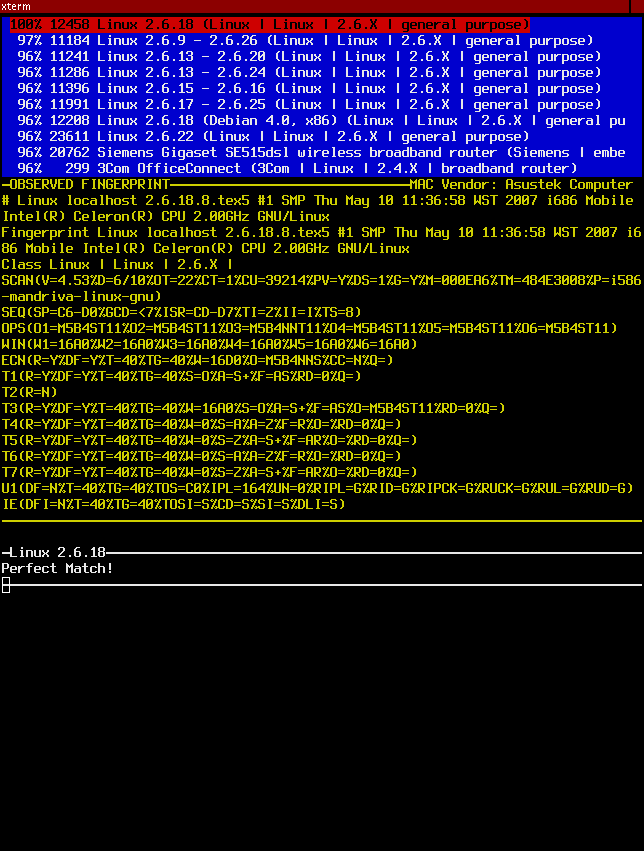
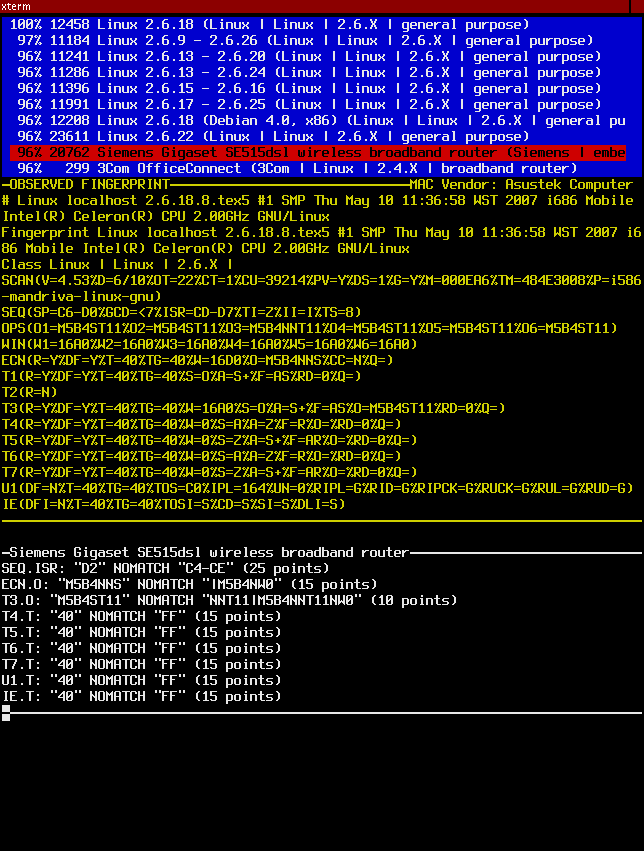
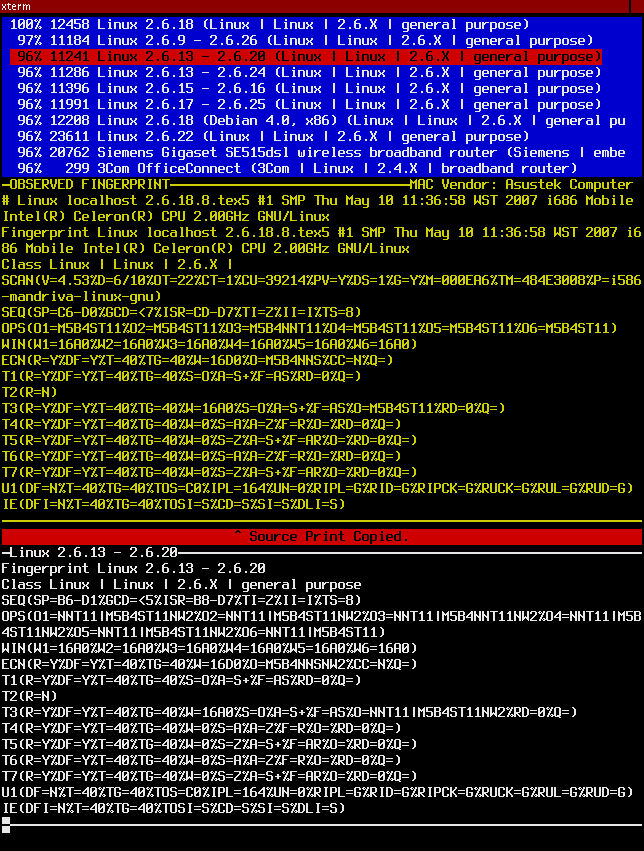
These requirements were met by the OSassist program written by Michael Pattrick during the Summer of Code 2008. Here are some screenshots to see what it looks like.
^ Source Print Copied means that the fixed observed print has been copied to the X clipboard.
David Fifield
Did you ever wonder what happens after you submit an OS fingerprint at the submission page? Someone looks at every one of those submissions and uses tools in the nmap-dev area of the Subversion repository to build them into the OS database. This document explains how this process works now and gives requirements for a simple new tool to make it easier.
There are three primary tools for OS integration: fingermatch, fingerdiff, and fingerfix.
fingermatch
    Found **1 PERFECT MATCHES** for entered fingerprint in nmap-os-db:
    Accu Line# OS (classification)
    100%  7165 IBM OS/400 V5R2 (IBM | OS/400 | V5 | general purpose)
    **ADDITIONAL GUESSES** for entered fingerprint in nmap-os-db:
    Accu Line# OS (classification)
     97%  7148 IBM OS/400 V5R1M0 (IBM | OS/400 | V5 | general purpose)
     96%  7131 IBM OS/400 V4R5 (IBM | OS/400 | V4 | general purpose)
     95%  6995 IBM i5/OS V5 (IBM | i5/OS | V5 | general purpose)
fingerdiff
    SEQ.SP: "AE" NOMATCH "0-5" (25 points)
    SEQ.ISR: "B2" NOMATCH "0-5" (25 points)
    T3.R: "N" NOMATCH "Y" (80 points)
    Accuracy of the two prints is 96% -- see differences above.
fingerfixSEQ.GCD field and widens the ranges for tests like SEQ.SP and SEQ.ISR. It can also merge a submission into an existing database entry, causing it to match more. Its output is identical to an entry in nmap-os-db.
Fyodor emails me mbox files containing the new submissions and corrections. I put them in my nmap-dev working directory. I svn update in my nmap working directory and copy nmap-os-db into nmap-dev. I open two big xterm windows, each as tall as the screen. In the left xterm, I open Vim on nmap-os-db. In the right xterm, I have GNU Screen running with two screens: One has Mutt open on the mbox file, and the other is a shell where I run the finger* tools. Having these in the same place on the screen reduces the amount of mouse movement I have to do. in the background I open a web browser with Google so I can look up model numbers.
I look at a submission. If it doesn't have enough information, I skip it without thinking twice. Otherwise, I highlight the submission with the mouse, go to the shell and paste it into fingermatch immediately, even before looking at the submission in detail. If I get one (and only one) 100% match, I check to see if the OS in the submission is the same as what's in the database. If it is, I move on to the next submission. If not, like when a fingerprint matches a new Linux micro revision, I mouse over to the Vim window and make the change. Then I go to the next submission.
If there are no 100% matches, I have to find out what doesn't match. That means I have to run fingerdiff against the closest match at least, and usually the first two or three. This is the part that's really cumbersome. fingermatch returns a list of database line numbers that must be given to fingerdiff. I type "^rdiff" to get a line like ./fingerdiff nmap-os-db:12345 at the prompt, then I replace the line number with the correct one. I have to paste the submission once again into the program. The diff usually takes up most of the screen, so I scroll the xterm back to see the line number of the next closest match, remember it, and give it to fingerdiff again. By this time the terminal is cluttered and it's hard to find my match results, so I run fingermatch again. I repeat this process until I get enough information. I would really like to run fingerdiff on the closest five matches for every submission, but that just takes too long.
If there are no close matches, I create a new fingerprint by running fingerfix with no arguments. I highlight the new fingerprint and paste it into Vim. Then to check, I go back and highlight the submission (again) and run fingermatch to make sure I have a 100% match.
If there's a close match, I just make an adjustment to an existing fingerprint. You can do this by giving fingerfix a line number, but more commonly I just edit the database with Vim so I can better control the results. Then I run fingermatch again to make sure I have a match.
If I find an unusable submission for a new operating system, I limit the view in Mutt to find other submissions for the same OS and handle them right away. If I'm not sure about what to do with a submission, I flag it (F key in Mutt) to look at it later.
A significant fraction of my OS integration time is spent carefully highlighting submissions with the mouse. This takes more dexterity than it should, especially when I'm pasting the same submission multiple times into the finger* tools. Ten or twenty times during every integration session I paste a submission into the shell by mistake and get a screen full of Bash errors. An integration tool would know that I'm essentially working on one submission at a time, and I won't have to keep reminding it which one I'm working on.
I estimate that we get about 1500 submissions every three months. By looking at my log, I see that I can do between 40 and 80 submissions an hour. Estimating an average of 60 submissions an hour, that means 25 hours of work every three months. If we can save one second per submission, that saves 25 minutes for the whole batch. Cutting off ten seconds per submission saves more than four hours.
The biggest difficulties in OS integration are copying and pasting and typing in line numbers. A tool that could eliminate those things could make it a lot easier.
I see a small graphical (or semi-graphical, like with Ncurses) application that runs a fingermatch for me and allows me to interactively do a fingerdiff on the top matches. I want to be able to hit a key in Mutt and have the submission piped into this little program, which will appear on the screen. I can hit a key to create a new fingerprint or merge with an existing one, and whatever it is gets copied to the clipboard automatically. I still see line numbers so I can hack the database manually if I need to. When I'm done the application disappears and sets me back at Mutt.
osprintsunwrap.pl),
fingerfix's two functions: creating a new fingerprint and merging an existing fingerprint. The fingerprint will be automatically copied to the clipboard. It is not necessary to show the new fingerprint on the screen, because I'm just about to paste it anyway, but the application should give some indication of what it has done: "XXX bytes copied to clipboard."
fingermatch/fingerdiff, or you can link with the Nmap functions in osscan.cc. However those functions will probably need some work to make them easily usable in a program like this.
fingermatch and ten fingerdiffs.
../nmap). However, the program must have good internal documentation (i.e., comments) and follow good coding practices. Also write with an eye towards easy maintenance.
You can email me at david@bamsoftware.com.